 TwinHop
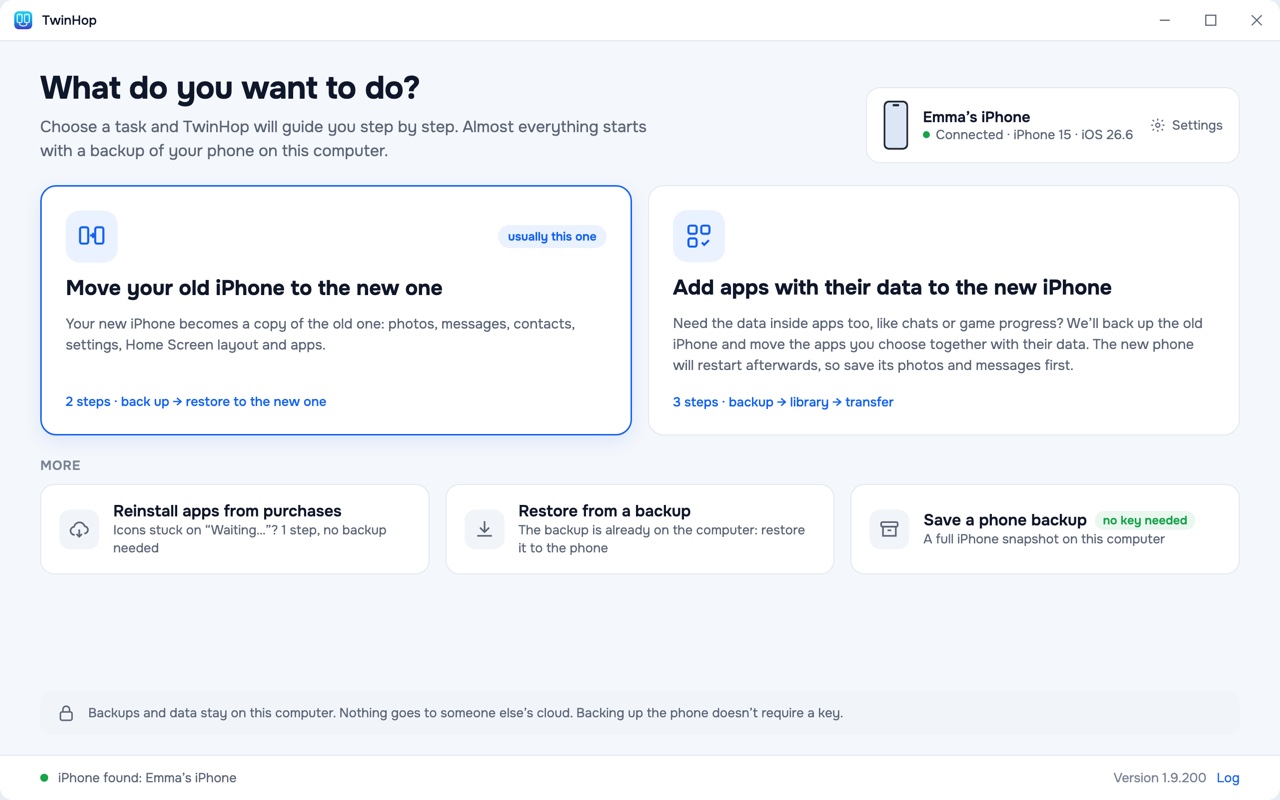
What do you want to do?
Move to a new iPhone
The whole phone, apps and their data included, in one restore.
Back up your iPhone
A full backup on your computer. No key needed.
Move selected apps with their data
New iPhone already set up? Add only the apps you need.
Messages and chats
Texts, iMessage and WhatsApp chats go to the new iPhone with their history.
Photos and videos
The photos and videos on the phone move with the backup.
Contacts, calendars, notes
And voice memos, settings and the Home Screen layout.
Reinstall apps from purchases
When the old phone and its backup are gone.
For repair shops
Move customers’ phones, with a report for each client.
Your new iPhone, set up like the old one
Apps, their data, messages, photos, settings and the Home Screen arrive together. You connect each phone with a cable once; TwinHop does the rest.
Back up the old iPhone No key
Connect it with a cable. TwinHop saves a full backup to your computer. Once it’s done, the old phone can be wiped or sold: the backup stays with you.
Connect the new iPhone $19.99 key
Sign in to your Apple Account in TwinHop, and it first installs your apps over the cable from your purchases. Without signing in the move still works: afterwards the phone downloads the apps from the App Store itself.
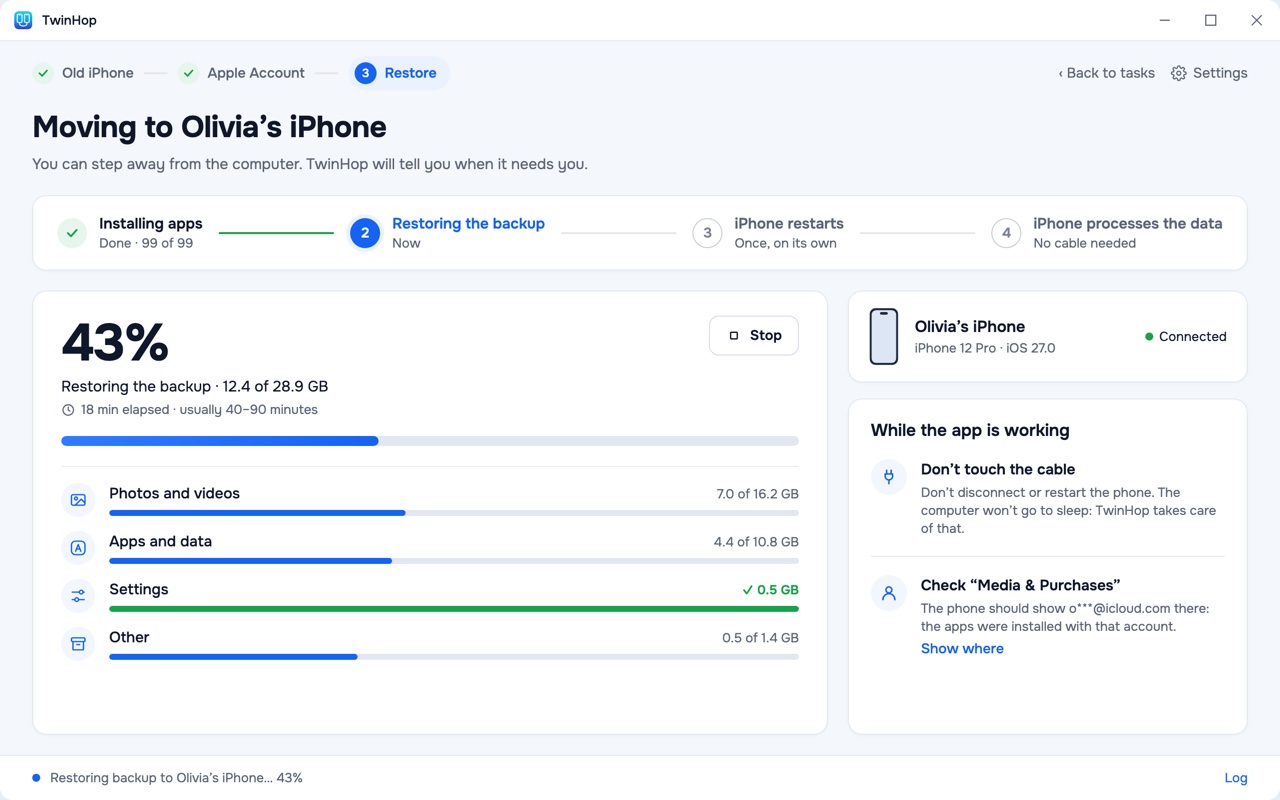
TwinHop restores the backup
Each app gets its data back, and the phone restarts once. You can step away: TwinHop keeps the computer awake and shows what is being transferred.
Before you start. A full move makes the new iPhone match the backup: anything on it that isn’t in the backup will be replaced. TwinHop warns you about this before you click. Turn off Find My on the new iPhone: iOS won’t restore data while it is on.
The order that keeps your data · Quick Start, iCloud or a computer?
A full iPhone backup on your computer, no key needed
No key, no sign-in and no time limit. The backup is yours: ordinary files in a folder you choose, on an external drive too, ready when you need them.
Everything in one backup
Photos and videos on the phone, messages, contacts, calendars, notes, voice memos, settings, the Home Screen and the data of your apps.
Kept off the cloud
No iCloud storage to pay for. The backup is written to your Mac or PC over the cable and never reaches our server.
Picks up where it stopped
If the cable disconnects, “Continue backup” carries on in the same folder instead of starting over.
Restore it later
“Restore from a backup” puts it back on an iPhone when you need it: after a reset, a repair or a replacement. Restoring needs a key.
TwinHop makes unencrypted backups. Apple keeps call history, Health data and saved passwords only in encrypted ones, so these stay on the old phone. If backup encryption is on, TwinHop shows you how to turn it off first. How to back up an iPhone to a computer
Apps arrive with their data
Game progress, chat history, documents and app settings go back into the apps they came from.
Why order matters
iOS writes an app’s data only into an app that is already installed. Restore the backup first, and iOS quietly drops that data while reporting success. TwinHop installs the apps first, then restores the backup into them.
New iPhone already set up?
Choose “Add apps with their data to the new iPhone”. Pick the apps you need, such as a game, a messenger or a bank, and they move with their data in one restore. After any restore, iOS may remove photos and messages that aren’t in iCloud, so TwinHop backs up that phone first.
Transfer app data to a new iPhone · Add apps after setup · Restore one app from a backup
What moves to the new iPhone
Everything Apple puts in an iPhone backup. Here is the list, and what stays behind.
Moves
- Photos and videos
- Messages and iMessage
- Chat apps such as WhatsApp
- Contacts
- Calendar
- Notes
- Voice Memos
- Apps with their data
- Home Screen layout
- Settings
Stays behind
- Saved passwords from the Keychain. Apple keeps them out of unencrypted backups, so some apps ask you to sign in once.
- Call history and Health data. Apple keeps them only in encrypted backups.
- Music and books bought from Apple or synced from a computer: download them again on the new phone.
- TestFlight, enterprise and developer builds. TwinHop installs only apps from the App Store.
- Moving from Android. TwinHop works from iPhone to iPhone.
Good to know
- Photos only in iCloud aren’t in a backup. They come back when you sign in to iCloud on the new phone.
- Messages in iCloud. If it is on, iOS may keep syncing messages and notes for a few hours after the move.
- WhatsApp keeps its chats, but may ask you to confirm your phone number on the new iPhone. Keep your SIM card or number at hand.
- Banking and authenticator apps move their data, but many ask you to activate them again. Keep the old phone until they work.
Reinstall apps from purchases
The phone was restored from iCloud and app icons are stuck on “Waiting…”, or the old phone is gone? Connect the iPhone, sign in, pick the apps, and TwinHop reinstalls them over the cable from your Apple Account purchases.
Only apps from the purchases of the account you sign in with come back, and without their data: to keep the data, move from a backup. Downloading from purchases relies on an Apple mechanism that isn’t documented, and Apple may change it. Moving data from a backup doesn’t depend on it.
Move your customers’ iPhones, client after client
A license for shops and services that move phones for payment: unlimited iPhones, a clean computer between customers, and a report you can hand over.
Next client
One button signs out of the customer’s Apple Account and removes their backups and apps from the computer.
Client report
Which apps came back, which didn’t, and why.
A checksum for every file
TwinHop records a SHA-256 checksum of each file it sends, so you can show what arrived.
Mac and Windows
3 workstations with Repair shop, no limit with Repair shop Plus.
Why you can trust it with your iPhone
No jailbreak
TwinHop uses the backup and restore built into iOS and doesn’t modify iOS. Backing up only reads from the old iPhone. Before anything on a phone is replaced, TwinHop warns you.
Your data stays on your disk
Photos, messages, contacts and app data never reach our server. Your Apple password goes only to Apple: you sign in only to install apps from your purchases, and moving data never needs it.
Signed by a named company
The Mac app is signed with the Apple Developer ID of UNICGLOBAL ENGINEERING LTD, Cyprus, and notarized by Apple. The Windows app is signed by the same company.
14-day refund
Changed your mind before moving data or installing apps to an iPhone? Ask within 14 days. Something went wrong after that? Write to support@twinhop.com anyway.
What our server receives: license checks, update checks and transfer statistics, with a switch in Settings. Privacy Policy · A move we measured, file by file
Pricing
Download TwinHop and back up your iPhone with no key. Buy a key when you are ready to move: you pay once, it works for a year, and nothing renews.
- Move the whole iPhone
- Add apps with their data
- Restore from a backup
- Reinstall apps from your purchases
- Up to 5 iPhones, for you and your family
- 3 computers, Mac and Windows in any mix
- Updates during the year
For repair shops and services that move their customers’ phones.
- Commercial use: work on customers’ phones for payment
- Unlimited iPhones
- 3 computers, Mac and Windows in any mix
- Next client button and client report
- A SHA-256 checksum of every file sent
- Everything in the personal license
For shops with more than three workstations.
- Everything in Repair shop
- No limit on computers, Mac and Windows in any mix
- Priority support: your emails are answered first
Buy
The key arrives by email right after payment. No account to create.
Backups without a key, a key for moving, nothing to cancel
- No key. Download TwinHop, back up any number of iPhones and keep the backups as long as you like.
- With a key. Move to a new iPhone, add apps with their data, restore a backup, reinstall apps from purchases.
- Nothing to cancel. The key ends after a year on its own, and nothing renews. Your backups stay, and backing up keeps working.
- Only the key in your cart. Checkout has one item. The key arrives by email, with no account to create.
Questions
What can I do without a key?
Downloading and backing up need no key, with no time limit. Moving to a new iPhone, adding apps with their data, restoring a backup and reinstalling apps need a $19.99 key for one year.
Will my new iPhone be erased?
A full move makes it match the backup, so anything on it that isn’t in the backup is replaced. Adding selected apps also uses a restore, and TwinHop backs up that phone first. You see a warning before anything starts.
Do I need iCloud or iTunes?
No iCloud. On Windows you need Apple’s Apple Devices app (or iTunes) so that Windows can see the iPhone. On a Mac nothing else is needed.
Do I need to sign in to my Apple Account?
Not to back up or to move data. Signing in lets TwinHop install your apps from your purchases before the data goes in. Your password goes only to Apple.
How long does a move take?
The first backup usually takes 10 to 40 minutes, restoring it 40 to 90 minutes. Photos and videos take most of the time.
Is the key a subscription?
No. It is a single payment that ends after a year. Nothing is charged again.
Popular guides
Download TwinHop
Download and back up without a key. One key works on both systems.
Which one? The one for the computer you’ll plug the phones into.
On a phone right now? TwinHop runs on a computer: open twinhop.com on your Mac or PC to download it. The Mac app is signed by UNICGLOBAL ENGINEERING LTD and notarized by Apple. TwinHop downloads new versions itself and installs them when you quit.